Mahmudul Islam
Google Ads & Conversion Tracking Specialist
4 October 26
7 min read
Illustration by Fsdm Mahmudul
Google Ads for local businesses should be simple. Someone nearby needs a plumber, a dentist or a roofer, they search on their phone, they see your ad and they call. In practice, many local owners pay for clicks from the wrong town, the wrong searches and the wrong time of day, and the phone stays quiet.
This guide gives you a simple plan to fix that. You will learn how to target the right area, choose searches that bring buyers, and track every call so you know what is working.
It is the same approach our team uses in our Google Ads management service, written so you can follow it yourself.
A national online shop wants clicks from anywhere. A local business wants calls from people who can actually reach you. That changes almost every setting.
For a local business, the things that matter most are:
This one setting causes more waste than almost anything else we see in local accounts.
Keywords are the searches you want your ad to show for. Match types control how closely a search has to match your keyword.
For local businesses, we usually start with phrase match and exact match. Phrase match shows your ad for searches that include the meaning of your keyword. Exact match is tighter still. Broad match can work later, once your tracking is solid, but it can pull in a lot of unrelated searches early on.
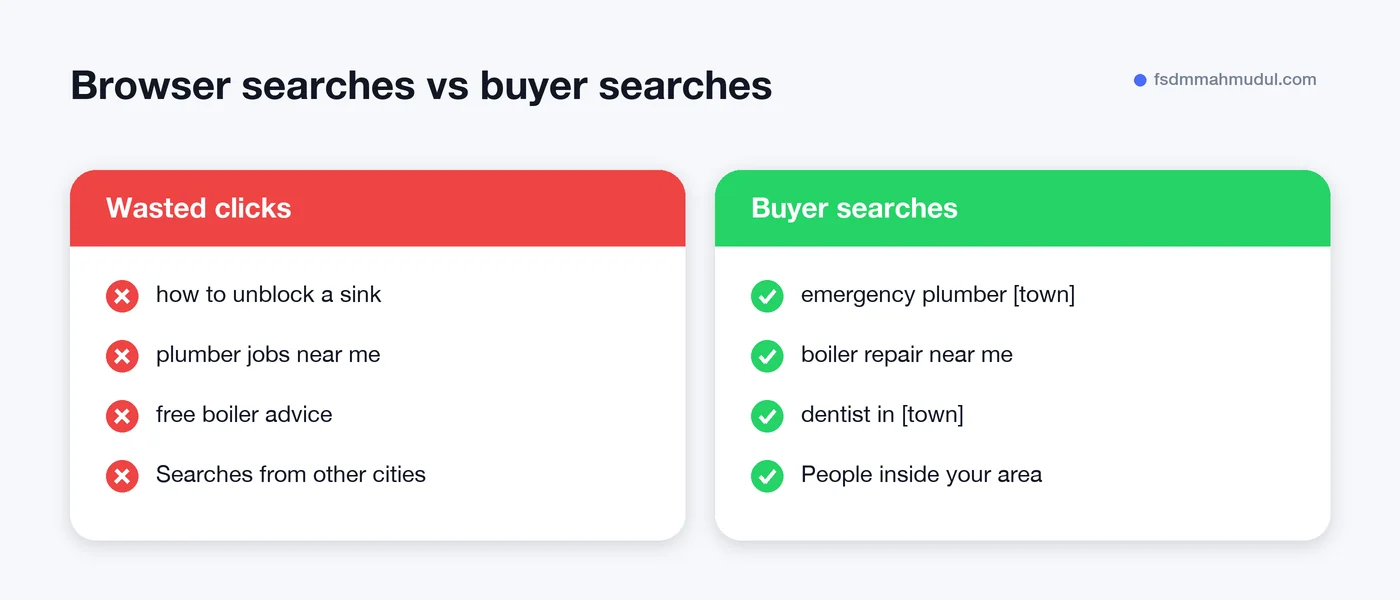
Focus on searches that show someone is ready to act:
| Search type | Example | Worth bidding on? |
|---|---|---|
| Urgent need | "emergency plumber [town]" | Yes, bid strongly |
| Service + area | "dentist in [town]" | Yes |
| Price check | "boiler repair cost" | Sometimes, test carefully |
| DIY or learning | "how to unblock a sink" | No, add as negative |
| Jobs | "plumber jobs near me" | No, add as negative |
Negative keywords are searches you tell Google never to show your ad for. Add words like "jobs", "salary", "course", "free" and "DIY" from day one.
Your ad and your landing page should both make calling the obvious next step.
If your ads already get clicks but few calls, the problem is often the page, not the ad. Our article on why Google Ads clicks are not turning into customers walks through the usual causes.
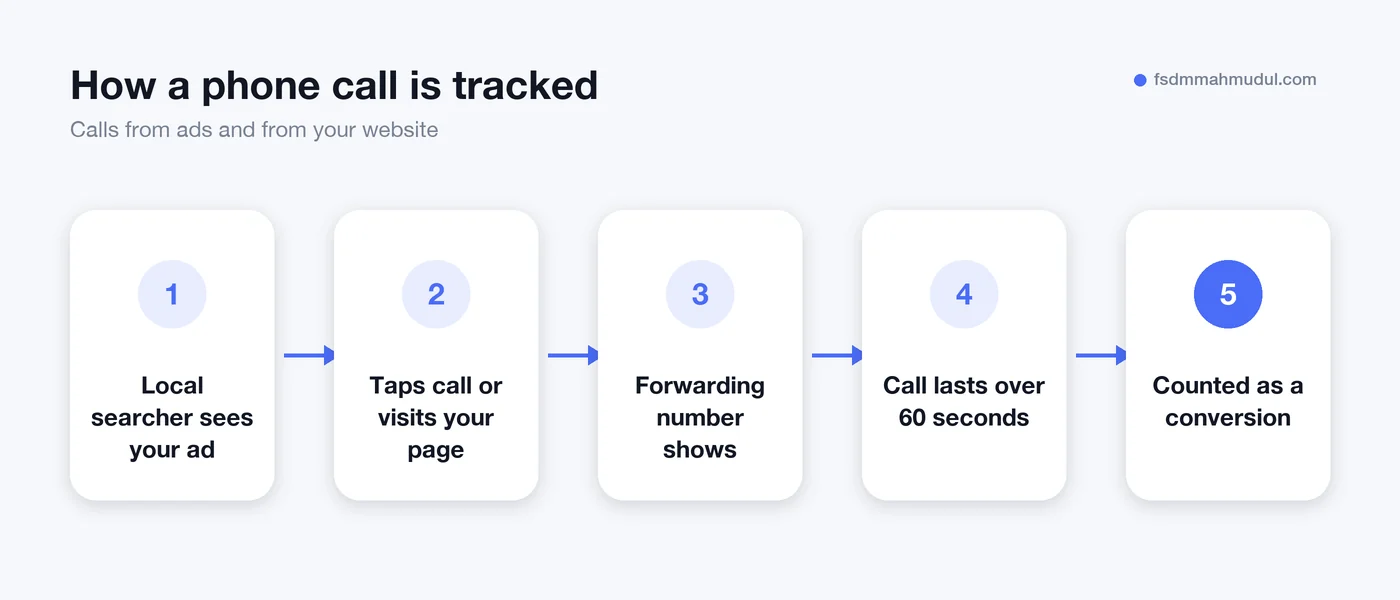
Without tracking, Google has no idea which clicks led to customers, so it cannot get better at finding them. You also cannot tell which keywords are worth paying for.
Set up these conversion actions in Google Ads:
If you serve customers in the EEA, Consent Mode v2 is also required so your tracking respects cookie choices and Google can still model missing data.
Start with a budget that can pay for enough clicks each day to get a few calls a week. If your budget only covers a handful of clicks a day, results will be slow and hard to judge.
For bidding, a common path is:
These come up again and again when we review local accounts:
It depends on how much a customer is worth to you and how competitive your area is. Start by working out what you can afford to pay for one new customer, then make sure your daily budget can cover several leads a week. Begin modestly, track results and increase once you see what a lead costs.
Local Services Ads are available in some countries and for certain trades, and you pay per lead rather than per click. They can work well alongside a normal Search campaign. Many businesses run both and compare the cost per real customer.
Ads can start getting clicks within a day of approval. It usually takes a few weeks of data and tweaking before the cost per call settles. Keep tracking in place from day one so those weeks are not wasted.
You can run call-only style ads with just a phone number, but a good landing page usually helps. It builds trust, answers common questions and gives people who do not want to call a way to send a form. It also helps Google judge how relevant your ad is.
Google Ads for local businesses works when the basics are in place: the right area, buyer-focused searches, an easy way to call, and tracking on every lead. Fix those and your budget goes much further.
Our team has helped 50+ clients over 5+ years, and you can see examples in our Google Ads project results. If you would like us to check your account, request a free Google Ads audit and we will show you where the calls are slipping away.
We can review your current setup and show which issue should be addressed first.
Get My Free AuditHere are answers to the questions people ask us most. Can't find yours? Message us and we usually reply within an hour.

We review your campaigns, tracking or conversion journey, then show you the main issue limiting performance, its business impact and a practical next step.
Yes. Most clients start from $1,000 a month in ad spend. We will tell you honestly if your budget is too small.
A dedicated specialist from our team runs your account day to day, and Mahmudul oversees the strategy and reviews the results. You always have one point of contact, so you never have to chase anyone.
No. Work is month to month and you can cancel any time.
Always. Your accounts, campaigns and tracking stay yours, even if we stop working together.
Wasted spend usually drops in the first 2 weeks. Steady growth shows by month 2 or 3.
Clients in Bangladesh, the US, UK, Canada, Australia and Europe. Our team works across time zones.
Request a free audit or message us on WhatsApp. We confirm the audit is a good fit, share our findings or invite you to a review, then agree the next step with Mahmudul.
Yes. Our tracking specialist checks that every sale, lead and call is counted correctly, because good ads need good data.
Yes. We send clear, simple notes your developer can follow, or our own developer makes the changes for you.
With a team. Mahmudul leads a small group of specialists in ads, tracking, page design and website development. Each person works on what they know best, and Mahmudul checks the work before it reaches you. If someone is away, another team member covers for them, so your work never stops.
You get a simple monthly report showing what we spent, what we got back and what we will do next. Mahmudul reviews every report before it is sent.