Mahmudul Islam
Google Ads & Conversion Tracking Specialist
5 October 26
6 min read
Illustration by Fsdm Mahmudul
"How much should I spend on Google Ads?" is one of the first questions every business owner asks us. The honest answer is that there is no single right number. But there is a simple way to work out a sensible Google Ads budget for your business, without guessing.
In this guide, our team shows you the formula we use, how to test a budget safely, and when it makes sense to spend more. You do not need to be a marketer to follow it.
If you would rather hand the numbers to specialists, our Google Ads management service sets and manages budgets for eCommerce brands, local businesses and agencies. But you can get a solid starting point yourself in about 15 minutes.
Google Ads works like an auction. You pay each time someone clicks your ad, and the price of that click depends on how many other businesses want the same searches.
That is why a plumber in a big city and a small online candle shop can need very different budgets. The cost per click (what you pay for one click) changes by industry, location, season and how well your ads are set up.
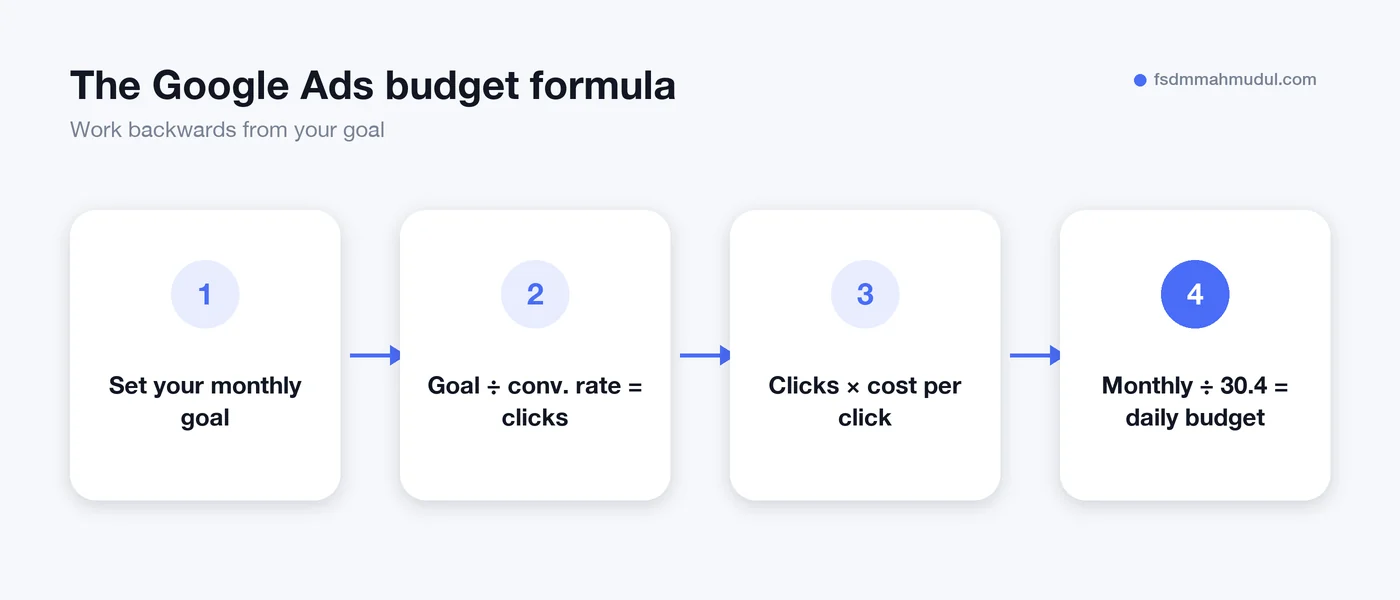
So instead of copying someone else's number, you work backwards from your own goals.
You only need three numbers to start:
Then follow these steps:
These figures are only an example. Plug in your own and the formula does the rest.
Google Ads may spend up to twice your daily budget on a busy day. But across a month, it will not charge you more than your daily budget multiplied by 30.4. So a €26 daily budget means you will not pay more than about €790 in that month.
This is normal, and it lets Google spend more on days with more searches. Just do not panic if one day looks high.
A budget that is too small can be as wasteful as one that is too large. If you only get a handful of clicks a week, you will wait months to learn anything useful.
As a rule of thumb, your budget should buy enough clicks each month to give you several real conversions. Google's automated bidding learns from those conversions. With very few, it struggles to find more buyers for you.
Here is a rough way to think about starting levels:
| Business situation | Starting approach | What to focus on |
|---|---|---|
| Local service, small area | Modest budget, tight keywords | Calls and form leads in your area |
| eCommerce, small product range | Shopping or Performance Max with a test budget | Return on ad spend per product |
| eCommerce, large catalogue | Split budget by best sellers first | Product feed quality and margins |
| Agency managing client accounts | Agree a test budget and goals in writing | Clear reporting from day one |
If you run a local business, our guide to Google Ads for local businesses covers location settings and call tracking in more detail.
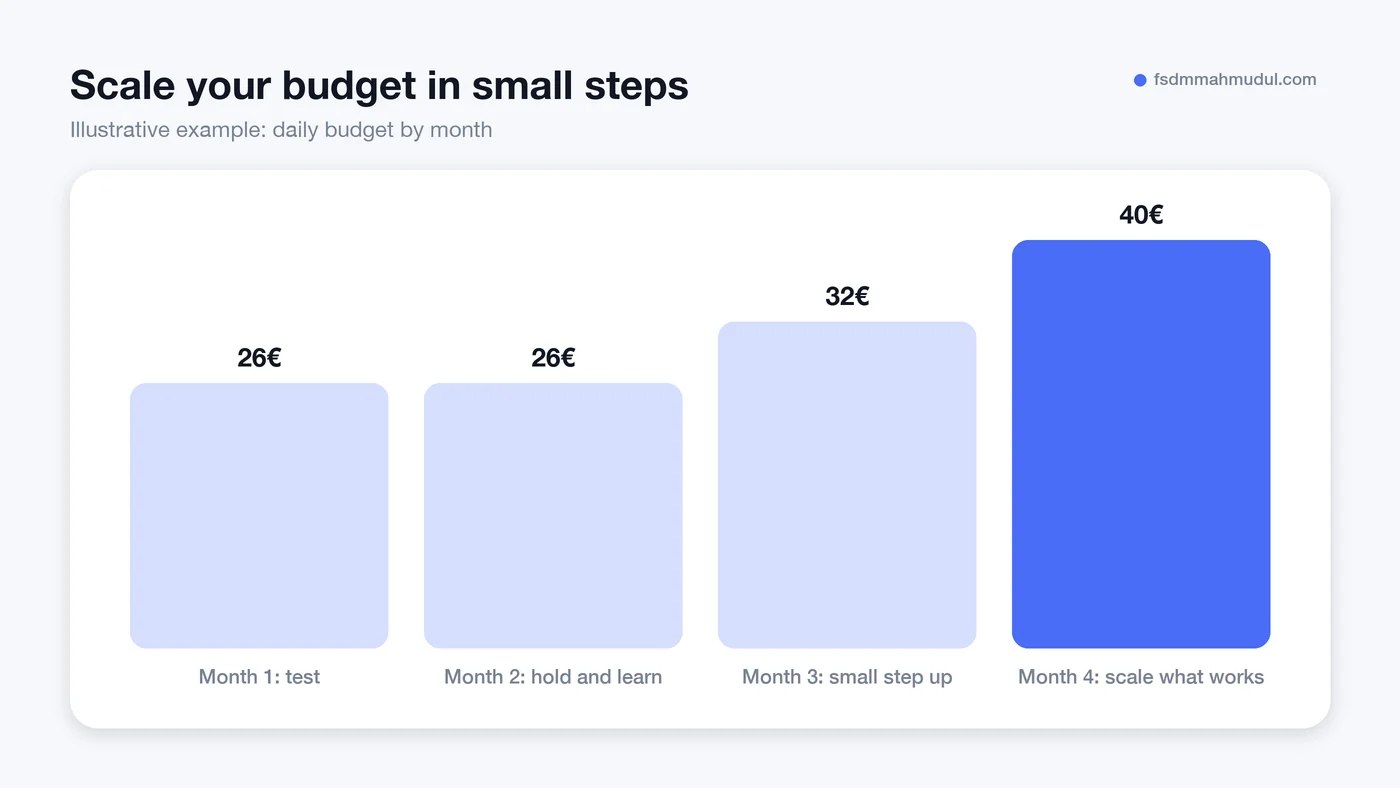
Do not commit your full yearly budget on day one. Treat the first month or two as a test.
Big, sudden budget jumps can push the campaign back into a learning phase, where results wobble for a while. Small steps keep things steady.
These are the mistakes we see most often when we take over an account.
A good starting budget is one that buys enough clicks to give you several conversions a month in your area and industry. Use the formula above with your own cost per click and conversion rate. Many small businesses start modestly with one focused campaign, then scale once tracking shows real results.
Google Ads campaigns use a daily budget by default, but billing is capped monthly at the daily budget times 30.4. In practice, plan monthly and set the matching daily figure.
Increase it when your cost per lead or cost per sale is profitable and stable, and your campaigns are limited by budget. Google shows a "Limited by budget" status when this happens. Raise spend in small steps and watch whether results hold.
Yes, but keep it focused. Use a few tightly matched keywords, a small location and one clear goal. A small budget spread too thin will not produce enough data to learn from.
Setting a Google Ads budget is not about guessing a number. It is about knowing what a customer is worth, what a click costs, and testing before you scale. Our specialists have done this for 50+ clients over 5+ years, including one account that tracked €109K in revenue from €11K in ad spend. You can see more in our Google Ads portfolio results.
If you want a budget plan built around your own numbers, book a free Google Ads audit and we will show you where your money should go first.
We can review your current setup and show which issue should be addressed first.
Get My Free AuditHere are answers to the questions people ask us most. Can't find yours? Message us and we usually reply within an hour.

We review your campaigns, tracking or conversion journey, then show you the main issue limiting performance, its business impact and a practical next step.
Yes. Most clients start from $1,000 a month in ad spend. We will tell you honestly if your budget is too small.
A dedicated specialist from our team runs your account day to day, and Mahmudul oversees the strategy and reviews the results. You always have one point of contact, so you never have to chase anyone.
No. Work is month to month and you can cancel any time.
Always. Your accounts, campaigns and tracking stay yours, even if we stop working together.
Wasted spend usually drops in the first 2 weeks. Steady growth shows by month 2 or 3.
Clients in Bangladesh, the US, UK, Canada, Australia and Europe. Our team works across time zones.
Request a free audit or message us on WhatsApp. We confirm the audit is a good fit, share our findings or invite you to a review, then agree the next step with Mahmudul.
Yes. Our tracking specialist checks that every sale, lead and call is counted correctly, because good ads need good data.
Yes. We send clear, simple notes your developer can follow, or our own developer makes the changes for you.
With a team. Mahmudul leads a small group of specialists in ads, tracking, page design and website development. Each person works on what they know best, and Mahmudul checks the work before it reaches you. If someone is away, another team member covers for them, so your work never stops.
You get a simple monthly report showing what we spent, what we got back and what we will do next. Mahmudul reviews every report before it is sent.