Mahmudul Hossain
Google Ads & Conversion Tracking Specialist
1 October 26
7 min read
Illustration by Fsdm Mahmudul
You check your Google Ads account and the clicks are there. The money is leaving your bank. But the orders, calls or form fills are not showing up. Google Ads not converting is one of the most common problems we see, and the cause is almost never "Google Ads doesn't work for my business."
In most accounts our team audits, the problem sits in one of a few places: broken tracking, the wrong searches, a weak landing page, or an offer that does not match what people expected. This guide walks you through each one in plain English, so you can find your leak and fix it.
If you would rather have specialists look at it with you, that is exactly what our Google Ads management service does. But first, let's work out what is actually going wrong.
Before you change a single ad, make sure the sales are actually missing. A surprising number of "no sales" accounts are really "no tracked sales" accounts.
Conversion tracking is the code that tells Google Ads when someone buys, calls or fills in a form. If that code is missing, firing twice, or only firing on some pages, your account looks broken even when it is not.
Here is a quick test you can do today:
If you also use GA4 (Google Analytics 4), remember it now calls conversions "key events." A key event in GA4 is not automatically a conversion action in Google Ads. You have to import it or set up a Google Ads conversion action directly with the Google Tag or Google Tag Manager.
Google's automatic bidding learns from the conversions you send it. If it never sees a sale, it cannot find more people like your buyers. It just keeps buying clicks.
Adding Enhanced Conversions helps here. It sends a scrambled (SHA-256 hashed) version of the customer's email to Google, so more sales are matched back to the right ad. If you get visitors from the EU or UK, you also need Consent Mode v2 set up, or a large share of that traffic goes unmeasured. You can see how we approach this in our Enhanced Conversions project work.
Once tracking is confirmed, the real causes usually fall into these groups.
Open the Search terms report. This shows the actual words people typed before clicking your ad. Many owners are shocked by what they find.
Broad match keywords can show your ad for loosely related searches. Someone searching "free logo template" can end up on a page selling a paid design service. That click costs the same as a buyer's click.
If your ad says "Same-day boiler repair" and the page opens on a general "About us" section, people leave. Visitors want to see the exact thing they clicked for, within a few seconds.
Most search clicks now come from mobile. If the page takes a long time to load, buttons are tiny, or the form is long, people give up before they ever see your offer.
Sometimes the ads are fine and the page is fine, but the offer loses. If shoppers compare you with three other sellers and you are the most expensive with no clear reason why, they buy elsewhere.
Your ads may be showing in areas you do not serve, or at 2am when nobody is ready to buy. Location settings set to "presence or interest" can also show ads to people who only searched about your area.
Performance Max is a campaign type that runs ads across Search, YouTube, Display, Gmail and Maps from one budget. It can work very well. But without good conversion data and clear brand exclusions, it may chase cheap clicks or take credit for people who already knew your brand.
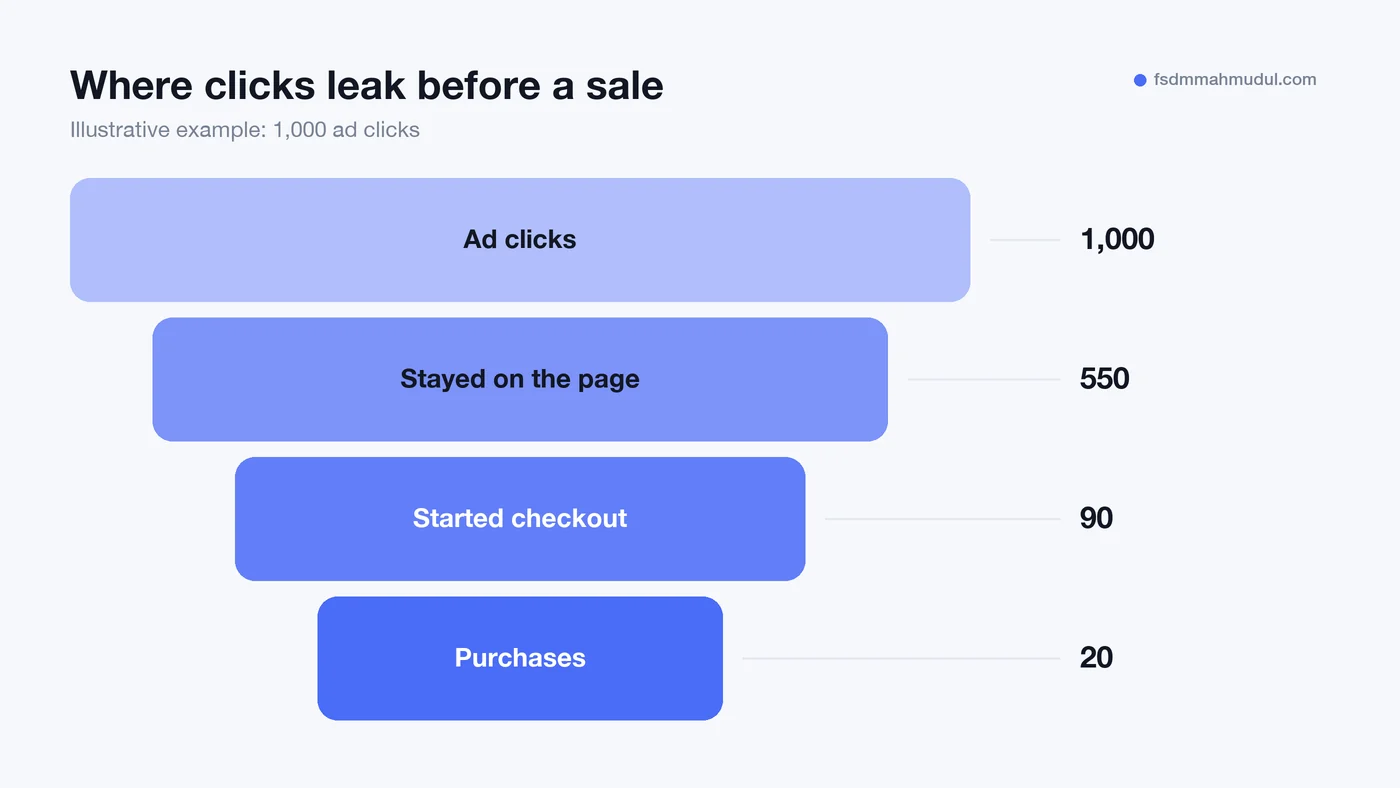
You do not need to fix everything at once. Use this table to match what you see in your account with the likely cause.
| What you see | Likely cause | Where to look first |
|---|---|---|
| Lots of clicks, zero tracked conversions | Tracking missing or broken | Goals, then Conversions |
| Clicks from odd, unrelated searches | Match types too loose, no negatives | Search terms report |
| High clicks, very short visits | Page does not match the ad, or loads slowly | Landing page on your own phone |
| Add-to-carts but no purchases | Checkout friction, shipping costs, trust | Your checkout steps |
| Good results in one area, none in another | Location or schedule settings | Locations and Ad schedule |
Start at the top of the table and work down. Tracking comes first because every other decision depends on it.
Once you know the leak, here are the fixes we apply most often.
For the landing page side, our landing page CRO checklist goes through each element in detail. CRO stands for conversion rate optimisation, which simply means getting more of your visitors to take action.
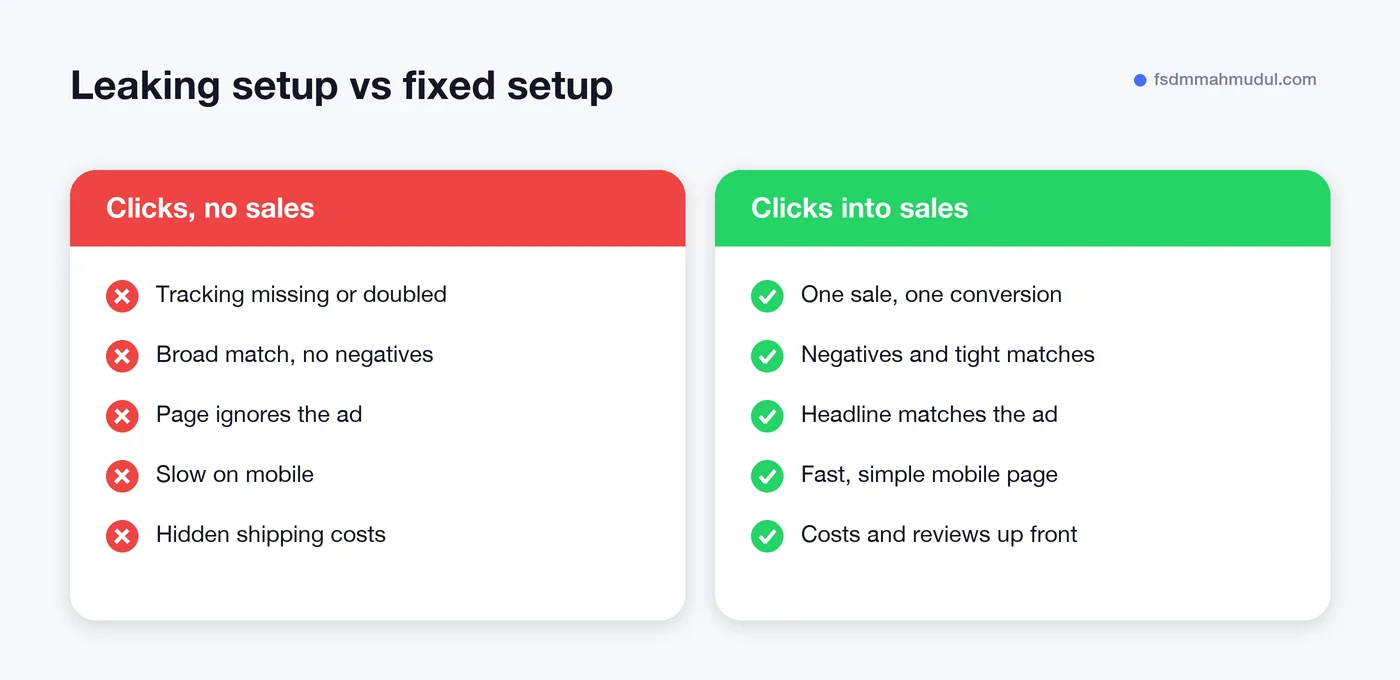
When ads stop selling, it is tempting to react fast. These moves usually make things worse.
There is no fixed number, because it depends on your price, industry and offer. A low-cost product may sell within a few dozen clicks, while a high-ticket service can take far more. If you are well past what you would normally expect and still see nothing, check tracking first, then search terms.
Yes. Google's automated bidding uses your conversion data to decide who to show ads to and how much to bid. Missing or duplicated conversions teach it the wrong lessons, so it buys clicks from people who are unlikely to buy.
Not always. Pausing stops the spend, but it also stops the learning. A better move is to cut obvious waste, like irrelevant searches and wrong locations, fix tracking, and keep a smaller budget running while you test the landing page.
It can be, but it is rarely the only reason. Performance Max relies heavily on good conversion data and clear goals. With broken tracking or a weak product feed, it struggles. With solid data, it often performs well.
Clicks without sales almost always have a clear cause. It just takes a methodical look to find it. Our team of Google Ads, tracking and CRO specialists has helped 50+ clients over 5+ years, including one account that tracked €109K in revenue from €11K in ad spend.
If you want us to find your leak for you, request a free Google Ads audit. We will show you exactly where your clicks are going and what to fix first.
We can review your current setup and show which issue should be addressed first.
Get My Free AuditHere are answers to the questions people ask us most. Can't find yours? Message us and we usually reply within an hour.

We review your campaigns, tracking or conversion journey, then show you the main issue limiting performance, its business impact and a practical next step.
Yes. Most clients start from $1,000 a month in ad spend. We will tell you honestly if your budget is too small.
A dedicated specialist from our team runs your account day to day, and Mahmudul oversees the strategy and reviews the results. You always have one point of contact, so you never have to chase anyone.
No. Work is month to month and you can cancel any time.
Always. Your accounts, campaigns and tracking stay yours, even if we stop working together.
Wasted spend usually drops in the first 2 weeks. Steady growth shows by month 2 or 3.
Clients in Bangladesh, the US, UK, Canada, Australia and Europe. Our team works across time zones.
Request a free audit or message us on WhatsApp. We confirm the audit is a good fit, share our findings or invite you to a review, then agree the next step with Mahmudul.
Yes. Our tracking specialist checks that every sale, lead and call is counted correctly, because good ads need good data.
Yes. We send clear, simple notes your developer can follow, or our own developer makes the changes for you.
With a team. Mahmudul leads a small group of specialists in ads, tracking, page design and website development. Each person works on what they know best, and Mahmudul checks the work before it reaches you. If someone is away, another team member covers for them, so your work never stops.
You get a simple monthly report showing what we spent, what we got back and what we will do next. Mahmudul reviews every report before it is sent.